
Chapter 1 - Computer Fundamentals
Premium Comprehensive Study Notes
1. Introduction to Computer System
1.1 What is a Computer?
A computer is an electronic device that accepts data as input, processes it according to a set of instructions, stores it when required, and produces useful information as output.
In simple words, a computer
- takes input
- processes it and
- gives output.
Example
Suppose you enter the marks of five students into a computer and ask it to calculate the total and average.- Input: Marks of the students
- Processing: Addition and calculation of average
- Output: Total marks and average
Basic Terms
Data
Data refers to raw facts and figures that have not yet been processed or organised. Data may consist of numbers, letters, words, symbols, images, audio, or video. .
- 72
- Rahul
- 15/08/2010
- 2500
- A photograph
Real-Life Example
To prepare tea, we need:
• Tea leaves
• Water
• Milk
• Sugar
These ingredients can be considered raw data for preparing tea.
Remember: Raw facts and figures = Data
Information
Information is processed and organised data that gives a meaningful result.
Suppose the marks of a student are:
75, 82, 91, 68
These numbers are data. If the computer calculates that the student's total marks are 316 and average marks are 79%, the result is information.
Instruction
An instruction is a command or direction given to a computer to perform a particular operation. A computer cannot decide what to do on its own. It follows instructions supplied by the user or by a program.
• Add two numbers
• Display a message
• Save a file.
• Print a document.
A collection of instructions written to perform a specific task is called a program.
Block Diagram of a Computer
Represents structural interaction between Input, Memory, CPU (ALU & CU), and Output.
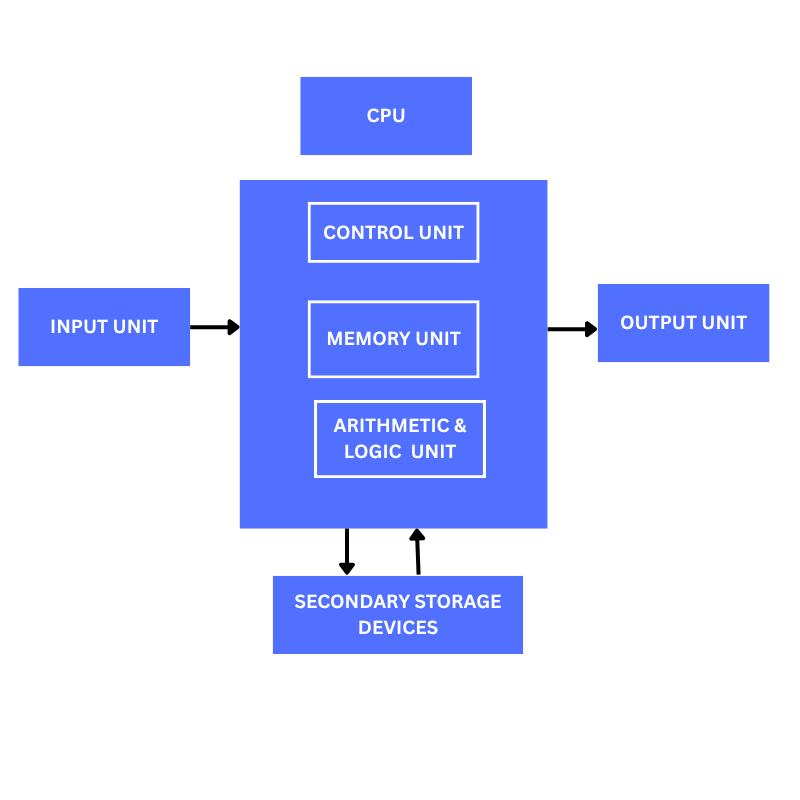
Parts of a Computer
A computer system consists of several important parts that work together.
The major parts are:
1. Input Unit
2. Central Processing Unit (CPU)
3. Memory Unit
4. Output Unit
5. Storage Devices
Each part has a specific role in the working of a computer.
Input Unit
The input unit is responsible for accepting data and instructions from the user and sending them to the computer for processing.
• Keyboard
• Mouse
• Scanner
• Microphone
• Webcam
• Touchscreen
• Joystick
Output Unit
An output unit is a hardware component of a computer that receives processed information from the CPU and presents the results to the user in a form that can be understood.• Monitor – displays text, images and videos.
• Printer – produces information on paper.
• Speakers – produce sound.
• Projector – displays computer output on a large screen.
Central Processing Unit (CPU)
The Central Processing Unit (CPU) is the main processing unit of a computer. It processes instructions, performs calculations and controls the activities of other parts of the computer.
The CPU is often called the brain of the computer because it performs the main processing and controls many operations.
Main Parts of CPU
The CPU mainly consists of:
1. Control Unit (CU)
2. Arithmetic and Logic Unit (ALU)
3. Registers
The CPU works closely with the memory unit while processing data
Control Unit (CU)
The Control Unit controls and coordinates the activities of different parts of a computer.
It tells other units what to do, when to do it, and how to do it.
• Fetches instructions from memory.
• Decodes the instructions.
• Controls the execution of instructions.
• Directs the movement of data between different units.
• Coordinates the activities of the computer.
Arithmetic and Logic Unit (ALU)
The Arithmetic and Logic Unit (ALU) is the part of the CPU that performs arithmetic and logical operations.Arithmetic Operations
It can also perform comparisons such as:
• Greater than
• Less than
• Equal to
• Greater than or equal to
• Less than or equal to
Logical Operations
The ALU can perform operations such as:
• Addition
• Subtraction
• Multiplication
• Division
Registers
Registers are very small and very fast storage locations inside the CPU.
They temporarily hold data, instructions, or intermediate results while the CPU is processing them.
Because registers are located inside the CPU, they can be accessed very quickly.
Example
During a calculation, the CPU may temporarily keep a number or an intermediate result in a register before using it for the next operation.
Memory Unit
The memory unit stores data, instructions and results so that they can be used by the computer.
Memory is an essential part of a computer because the CPU needs access to instructions and data while performing a task.
Example
When you open a program, the instructions and required data are loaded into memory so that the CPU can access them.
Units of Memory
Computer memory is measured in different units.The commonly used units and relationship are:
1 Byte = 8 bits
1 KB = 1024 Bytes
1 MB = 1024 KB
1 GB = 1024 MB
1 TB = 1024 GB
1 PB = 1024 TB
Computer Memory & Classification
Storage space divided into small parts called cells, which consist of binary bits (0 or 1). Memory addresses range from 0 to N-1.

Types of Memory
Computer memory can broadly be divided into:
1. Primary Memory
2. Secondary Memory
Primary Memory
Primary memory is the memory that can be directly accessed by the CPU.It stores the data and instructions that are currently being used or are readily available for processing.
Primary memory mainly includes:
• RAM
• ROM
• Cache Memory
RAM
RAM (Random Access Memory) is a type of primary memory used to temporarily store data and instructions that are currently being used by the computer.
RAM is volatile memory, which means that its contents are normally lost when the power is switched off.
Example
When you open a web browser or a word processor, the required data and instructions are loaded into RAM
There are 2 types of RAM
1. Static RAM (SRAM)
2. Dynamic RAM(DRAM)
ROM
ROM (Read Only Memory) is a type of primary memory that stores instructions that are needed for starting or operating the computer.ROM is non-volatile, so its contents are retained even when the power is switched off.
Example
The firmware required to start a computer is stored in non-volatile memory.
Types of ROM
1. PROM
2.EPROM
3.EEPROM
Secondary Memory vs Primary Memory
Secondary memory provides large, permanent, long-term storage (Non-volatile).
| Feature | Primary Memory | Secondary Memory |
|---|---|---|
| Purpose | Holds active processing data | Stores large data permanently |
| Capacity | Smaller | Significantly Larger |
| Volatility | RAM is Volatile / ROM is Non-Volatile | Non-Volatile |
| Examples | RAM, ROM, Cache | HDD, SSD, Pen Drive, CD/DVD |
Cache Memory
Cache memory is a small and very fast memory that helps the CPU access frequently used data and instructions more quickly. It is generally faster than main memory and is located very close to or integrated with the CPU.
Example
If the CPU repeatedly needs certain data, keeping that data in cache can reduce the time required to access it.
Why is Cache Memory Used?
The CPU can process instructions very quickly. If it had to wait for slower memory every time, overall performance would be reduced. Cache helps reduce this delay.
Secondary Memory
Secondary memory is used for long-term storage of data and programs.It is generally non-volatile, meaning that data remains stored even when the computer is switched off.
Examples
• Hard Disk Drive (HDD)
• Solid State Drive (SSD)
• Pen drive
• Memory card
• CD/DVD
Hardware
Hardware refers to the physical parts of a computer system that can be seen and touched.
Examples
• Keyboard
• Mouse
• Monitor
• CPU cabinet
• Motherboard
• RAM
• Hard disk
• Printer
• Speakers
Hardware cannot perform useful work without appropriate software.
Peripherals
Peripherals are devices connected to a computer that help it perform input, output, storage or communication-related tasks.
Examples
Input peripherals:
• Keyboard
• Mouse
• Scanner
Output peripherals:
• Monitor
• Printer
• Speakers
Storage peripherals:
• Pen drive
• External hard disk
• Memory card
Software
Software is a collection of programs, instructions and related data that tells a computer what to do. Unlike hardware, software cannot be physically touched.Examples
• Windows
• Linux
• Microsoft Word
• Web browsers
• Media players
• Games
A computer needs both hardware and software to perform useful tasks.
Types of Software
Software can broadly be classified into:
1. System Software
2. Application Software
System Software
System software is software that manages and controls computer hardware and provides a platform for running application software.Application Software
Application software is designed to help users perform specific tasks.
Application software can be divided into
1. General-purpose software and
2. Special-purpose/custom software.
Exam Quick-Reference Comparisons
DRAM vs SRAM
| Feature | DRAM | SRAM |
|---|---|---|
| Technology | Capacitors | Flip-flops |
| Refresh Need | Required periodically | Not required |
| Speed & Use | Slower (Main Memory) | Faster (Cache Memory) |